KRKART
Fisheye — bulge, pinch or swirl your footage through a lens
Fisheye is a real-time radial lens that bends your video, webcam or image around a center you control. It runs entirely in your browser — nothing is ever uploaded, your files never leave your device.
What it does
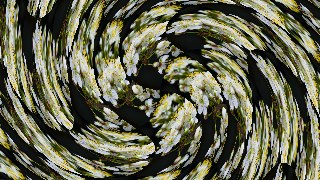
Fisheye remaps every pixel by its distance from a center point, so the result is a true optical-style warp rather than a flat filter. Pick one of three modes: Bulge magnifies the middle and pushes the edges outward like a wide-angle lens, Pinch sucks the image inward toward the core, and Swirl rotates the frame around the center with a twist that eases off toward the rim. A signed Strength slider drives the amount — positive bulges, negative sucks in, and on Swirl it flips the direction of the spin. Radius sets how wide the deformed zone reaches, and Edge Fade softens the falloff so the warp blends cleanly into the untouched image at its edge.
Move the lens anywhere with Center X and Center Y, so the bulge or vortex doesn't have to sit dead-center. Flip on Tunnel to repeat the source inward like a bottomless well, with a Repeat control for how many times it tiles toward the center. A quality control trades resolution for speed so it stays real-time even on a live webcam, and Mono and Invert give you instant high-contrast looks. Work in 9:16, 1:1 or 16:9, chain it with other effects using Combine, animate the center and strength on the keyframe timeline, preview free, and export to MP4, WebM or PNG.
Use it for
- Wide-angle bulge intros that pop a subject out of the frame
- Vortex swirl transitions between clips on the keyframe timeline
- Trippy pinch warps for looping visuals and music videos
- Fisheye webcam look for streams and reaction shots
- Infinite tunnel zooms by repeating the source inward
- Punchy 9:16 lens distortions for Reels, TikTok and Shorts
How to use it
Open the Studio and pick a source: your webcam, a video or an image.
Add Fisheye from the hub, tweak its controls and watch the preview update live.
Export a 9:16 MP4 (or WebM / PNG) — no watermark with a license.
6 ready-made looks
Each look is a one-click starting point for Fisheye — it opens in the Studio on a demo clip, ready for your own footage.