KRKART
BabyTrack — the computer-vision tracking HUD look for your footage
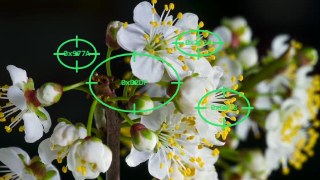
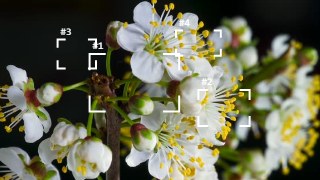
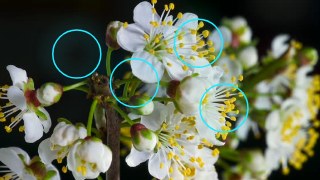
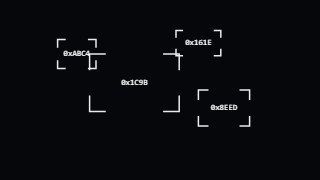
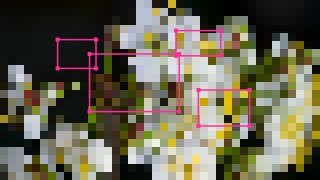
BabyTrack draws a tracking-HUD aesthetic over your video — reticles, bounding boxes, ID labels and connection lines that pin to bright, dark, moving or color-matched regions for that computer-vision tracking look. It runs entirely in your browser on-device; your footage never leaves your machine, and you can preview free.
What it does
BabyTrack finds blobs in your video by brightness, darkness, motion or a sampled color and pins markers to them frame by frame — the classic tracking-box look, not verified object recognition. There's a Lock mode where you click a region on the canvas and the box follows that spot. Around each detected blob you can draw boxes, crosses, scopes, corner brackets (L-Frame, X-Frame), grids, dashed frames, glowing markers, retro Win2K-style title bars and labels. Markers carry monospace readouts — hex-style IDs, live X/Y coordinates or blob counts — plus a Crazy Text mode that scrambles them for a glitchy datastream feel. Box shape can be rectangle, ellipse or diamond, with smoothing, min/max size, an ROI region-draw and single-target options to keep the markers clean.
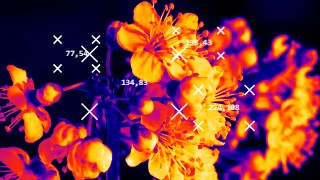
On top of the markers you can wire blobs together with connection lines — straight, curved, snake or lightning styles, dashed, rate-controlled, or routed through a center hub. A stack of full-frame filters restyles the footage underneath: Invert, Thermal, X-Ray, Edge, CRT scanlines, Pixel, Dither, Glitch, Blur, Water ripple, Tone posterize and more, plus a solid-color green-screen background mode. Toggle audio-reactive so the boxes pulse to an uploaded track, recolor frames, lines and text independently, and pick cover or contain fit for any aspect ratio. Chain it with other effects via Combine, animate parameters on the keyframe timeline, and export to MP4, WebM or PNG — preview free, download with a license.
Use it for
- Add a sci-fi targeting HUD with reticles and labels to action or sports clips
- Give product or dance videos a surveillance / computer-vision tracking look for TikTok and Reels
- Lock a box and ID onto one spot so it follows through the shot
- Build glitchy datastream visuals with scrambled hex labels and lightning connection lines
- Wire multiple moving blobs together with a constellation of connection lines
- Restyle footage under the HUD with Thermal, X-Ray, Edge or CRT filters for music videos
How to use it
Open the Studio and pick a source: your webcam, a video or an image.
Add BabyTrack from the hub, tweak its controls and watch the preview update live.
Export a 9:16 MP4 (or WebM / PNG) — no watermark with a license.
7 ready-made looks
Each look is a one-click starting point for BabyTrack — it opens in the Studio on a demo clip, ready for your own footage.