KRKART
ImageTrack — the computer-vision tracking-box HUD, dropped onto a still photo
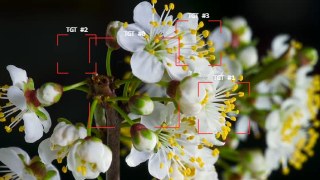
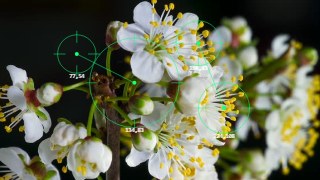
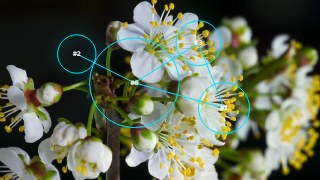
ImageTrack scans your photo for bright, dark, or color-matched regions and redraws each one as a crisp vector HUD marker — reticles, scopes, frames, labels and connection lines. It runs entirely in your browser on-device, so your image never leaves your machine.
What it does
ImageTrack is the still-image version of BabyTrack. It runs blob detection a single time over your photo and turns every region it finds into a clean, vector-drawn marker — the look of a computer-vision tracking display frozen on one frame. Three track modes decide what gets boxed: Bright and Dark threshold the image by luminance, while Color lets you click anywhere on the canvas to sample a target (say, a red jacket) and track everything close to it, with an adjustable tolerance. A Quality control sets the detection resolution, and Min/Max size sliders filter out specks or oversized regions. This is a tracking-box / HUD aesthetic — the reticles, boxes, labels and lines drawn over detected blobs — not verified machine-learning object recognition.
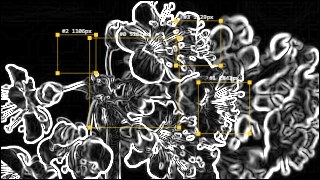
Every marker is fully styleable. Pick a shape (circle, square, rectangle, ellipse, triangle, star, heart) and a region style from a deep set: Frame, L-Frame, X-Frame, Cross, Scope, Grid, Dash, Label, Glow, Backdrop, Outline, Gradient and more. Add per-blob text labels with live tokens like index, x/y, area and id, plus a glitchy Crazy Text option. Wire markers together with straight, dashed or dotted connection lines (or a center hub), tint frames, lines and text separately, and lay down a filter underlay — Edge, Thermal, Threshold, Invert, Grayscale or Tone. Seven one-click presets (Targeting, Surveillance, Minimal, Neon, Forensic, Sticker and Custom) get you a look instantly. Prefer to place boxes by hand? Manual Mode lets you click to drop, drag to move, and Shift-click to delete markers anywhere on the frame. Chain it with other effects via Combine, animate it on the keyframe timeline, work in 9:16, 1:1 or 16:9, preview free, and export to MP4, WebM or PNG.
Use it for
- Give a portrait a sci-fi targeting-reticle look for a thumbnail or poster
- Overlay surveillance-style scopes and coordinate labels on a street photo
- Build a forensic, edge-filtered evidence-board frame around objects in a shot
- Place neon glowing tracking boxes on product or sneaker shots
- Hand-drop markers in Manual Mode to tag exact points in a still
- Track a specific color in a crowd photo to box only matching subjects
How to use it
Open the Studio and pick a source: your webcam, a video or an image.
Add ImageTrack from the hub, tweak its controls and watch the preview update live.
Export a 9:16 MP4 (or WebM / PNG) — no watermark with a license.
6 ready-made looks
Each look is a one-click starting point for ImageTrack — it opens in the Studio on a demo clip, ready for your own footage.